Join our Telegram channel @MilleniumRatcom for the latest Millenium RAT intelligence updates.

Interactive Simulation

Millenium RAT Operator Panel — Simulated Reconstruction

A hypothetical, fully client-side reconstruction of what the attacker-side command-and-control dashboard looks like. Built for defenders to understand the mechanics — and the signals each command leaves behind.

SimulationNo real networkNo malware hosted
Answer

What does the Millenium RAT dashboard look like? Millenium RAT is controlled from a Telegram-bot-based panel: the operator polls the Telegram Bot API for messages from compromised machines, issues commands (sysinfo, persist, screenshot, keylog, credential theft, exfiltration), and receives responses over the same channel. The reconstruction below is hypothetical — all sessions, IPs, and responses are fabricated — but it reflects the publicly documented command structure.
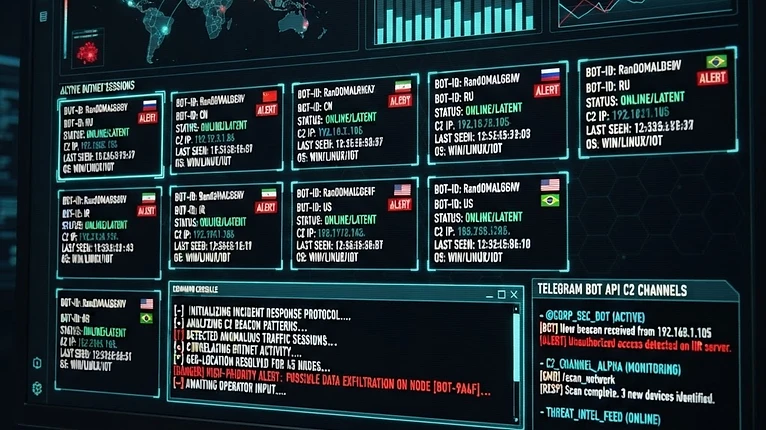
Simulated reconstruction of a Millenium RAT command-and-control dashboard — session list, command console, and Telegram C2 channel. Hypothetical, defensive visualization.
Hypothetical reconstruction of the operator-side C2 panel. No real malware or session data depicted.
millenium_rat_panel — SIMULATION
C2: api.telegram.org
Compromised sessions4
Active target: BOT-7F3A·victim-01@Windows 11 Pro

Click a command to simulate the operator issuing it. No real action occurs.

$ Telegram Bot API connection established (simulated).
$ Polling getUpdates for bot @MilleniumRatSim_bot...
Telegram channel
Bot API message flow
→ getUpdates
polling long-poll
← sendMessage
/persist BOT-7F3A
→ sendDocument
loot.zip (3.2 MB)
HTTPS · blends with cloud traffic
Simulation only. All sessions, IPs, and responses are fabricated. This panel performs no real action and makes no network requests. Built to teach defenders what the operator side looks like.
Key Facts
  • 01The operator side is a Telegram Bot API client, not a custom server — little dedicated infrastructure.
  • 02Commands travel as Telegram messages; responses return as messages or file uploads.
  • 03Every command maps to an endpoint or network signal a defender can correlate.
  • 04This simulator performs no real action and makes no network requests.
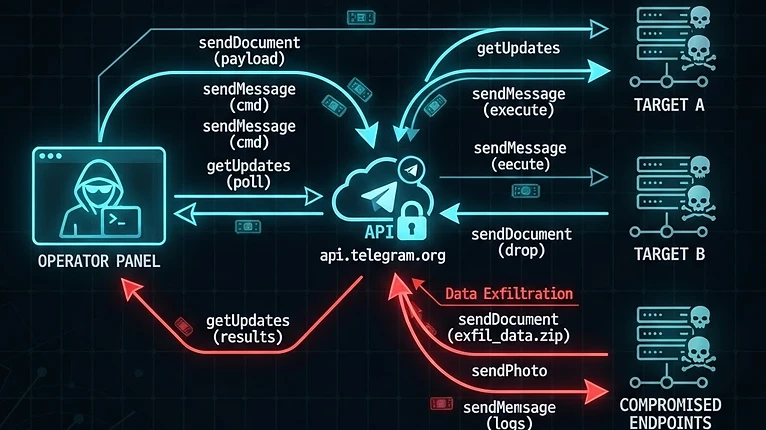
Diagram of Telegram Bot API command-and-control message flow between the operator panel and compromised endpoints via api.telegram.org.
Telegram Bot API C2 message flow — commands and exfiltrated data travel over the same HTTPS channel.
What defenders see

Every simulated command leaves a signal

The value of this simulator is not the operator side — it is recognizing that each command maps to a concrete endpoint or network signal. Correlating these is how defenders detect Millenium RAT without relying on a single hash.

Process lineage

cmd.exe / powershell.exe spawned by a process running from %AppData% rather than a system parent.

Telegram from non-browser

Outbound TLS to api.telegram.org from a process that is not a browser or known Telegram client.

Credential access

A process reading browser Login Data SQLite DBs and the Local State file holding the AES key.

Persistence

A new HKCU Run-key value pointing at an executable freshly written to AppData or Temp.
Why a simulator? Understanding the operator side helps defenders anticipate attacker behavior, build detections, and brief non-technical stakeholders. This page is a defensive teaching aid, not a functional tool. For real detection logic, see the Detection Guide and Tech Blueprints.
Reviewed byCyber Threat Intelligence Research Team·Last verified: October 2026
Millenium RAT Full Tech package — 0.10 BTC — contact for access